QUNIA / PRODUCT GUIDE
Getting started
Understand the platform and find the right first step for your site.
Product concept and deployment guideConfirm feature and integration availability separately
What does QUNIA do?
QUNIA is a platform designed to understand data center energy flows and support the next operating decision. It connects power, cooling, compute and storage across a workflow from forecasting and response review to outcome evaluation.
QUNIAThe platform operators use
OPXThe engine connecting forecasts with responses
LPMThe underlying predictive technology
What are you looking for?
How to read the product
- Overview · Forecast — Understand current conditions and upcoming risk.
- Decision · Guardrails — Review response options and the constraints they must meet.
- Operations · Verification — Track execution and evaluate subsequent outcomes.
Explore product screens ↗Scope of this documentation
These docs describe product concept screens and the intended design. Equipment control, autonomous execution, supported protocols and available features must be confirmed against site conditions and implementation status. Screen figures and facility names are illustrative.
QUNIA DOCUMENTATION / 02
Screen-by-screen guide
What to review, and how it informs a decision
Product concept guideUpdated October 5, 2026
Overview · Understand the current state
Start with current conditions, the predicted peak and decisions awaiting review. Always check the site, observation timestamp, units and forecast window behind each metric.
Key question: Where is headroom narrowing, and how much time is available to evaluate a response?
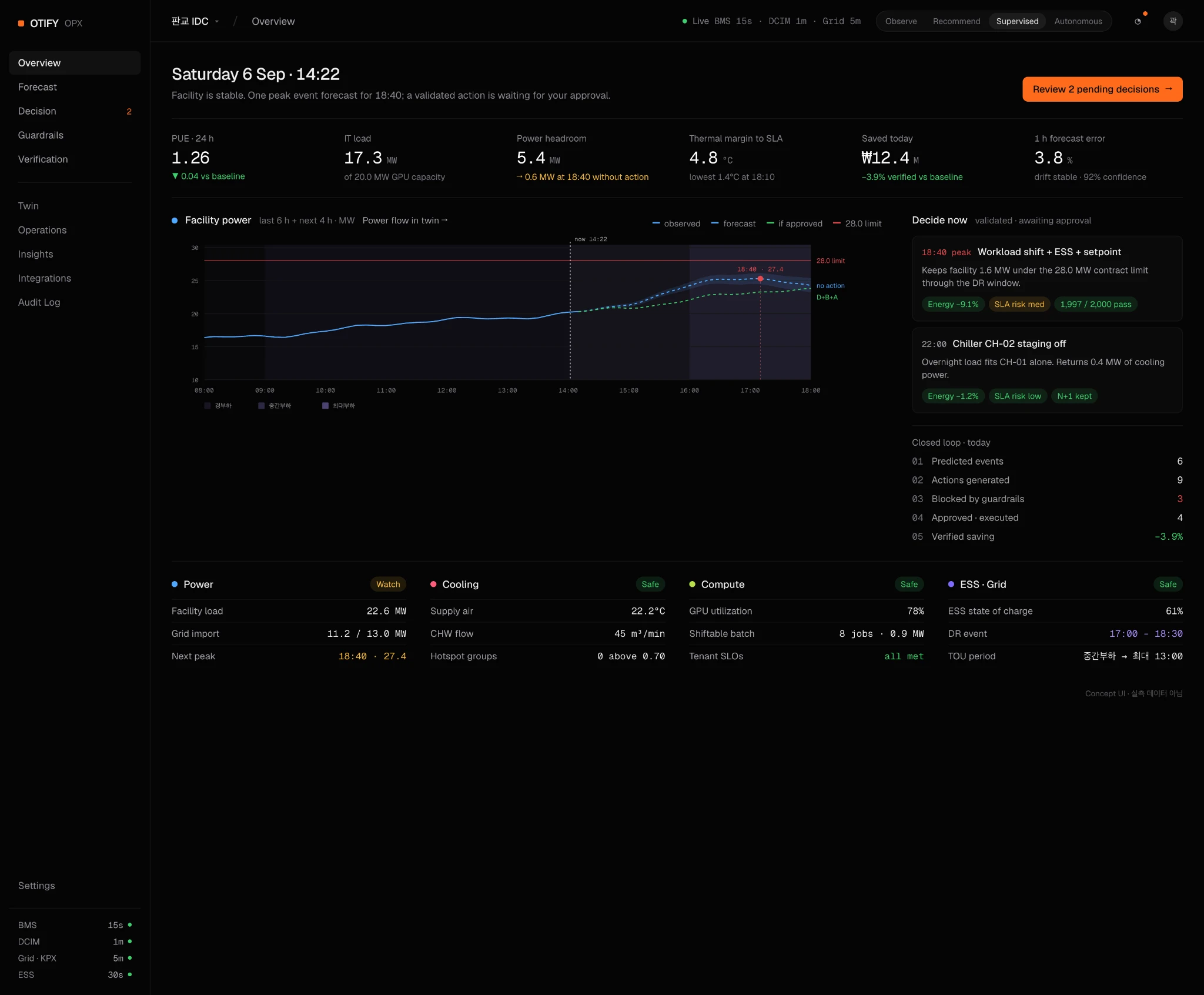 Product concept UI · Illustrative figures and facility names
Forecast · Anticipate the next state
Review expected power, thermal and compute changes on a shared timeline. Distinguish forecasts from observations and assess critical timing and key drivers. A forecast alone does not authorize execution; response options and site conditions also need review.
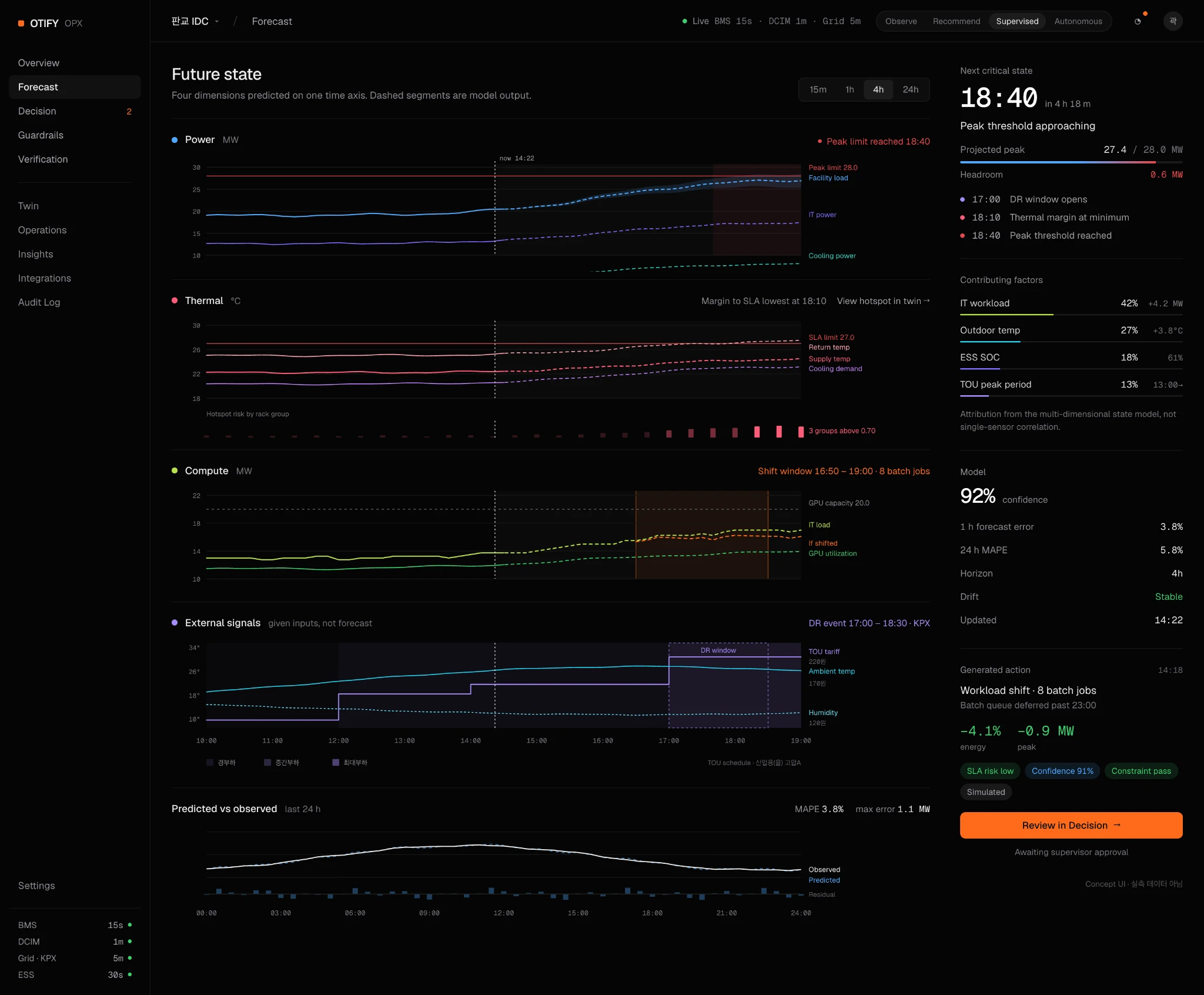 Product concept UI · Not measured forecast performance
Decision · Compare responses
Compare the cross-domain impacts of storage discharge, workload distribution and cooling adjustments. Review both the intended benefit and the associated demands, such as reduced storage charge, additional power or schedule changes.
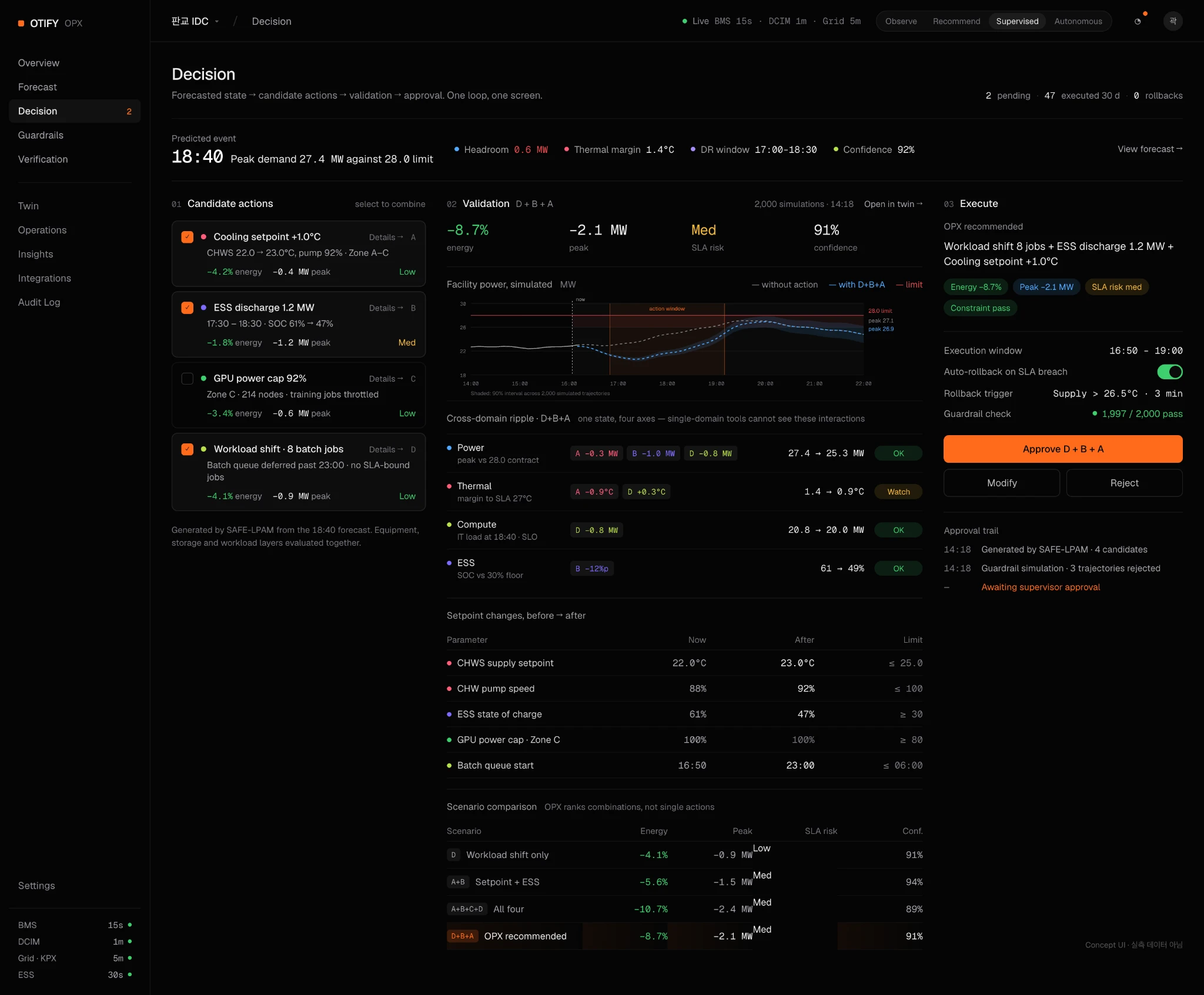 Product concept UI · Illustrative response options and effects
Guardrails · Check constraints
Review site-specific limits such as contracted power, temperature thresholds, workload SLAs and storage operating requirements. Options that fail a constraint need adjustment or replacement. Approval and blocking rules depend on site policy and implementation scope.
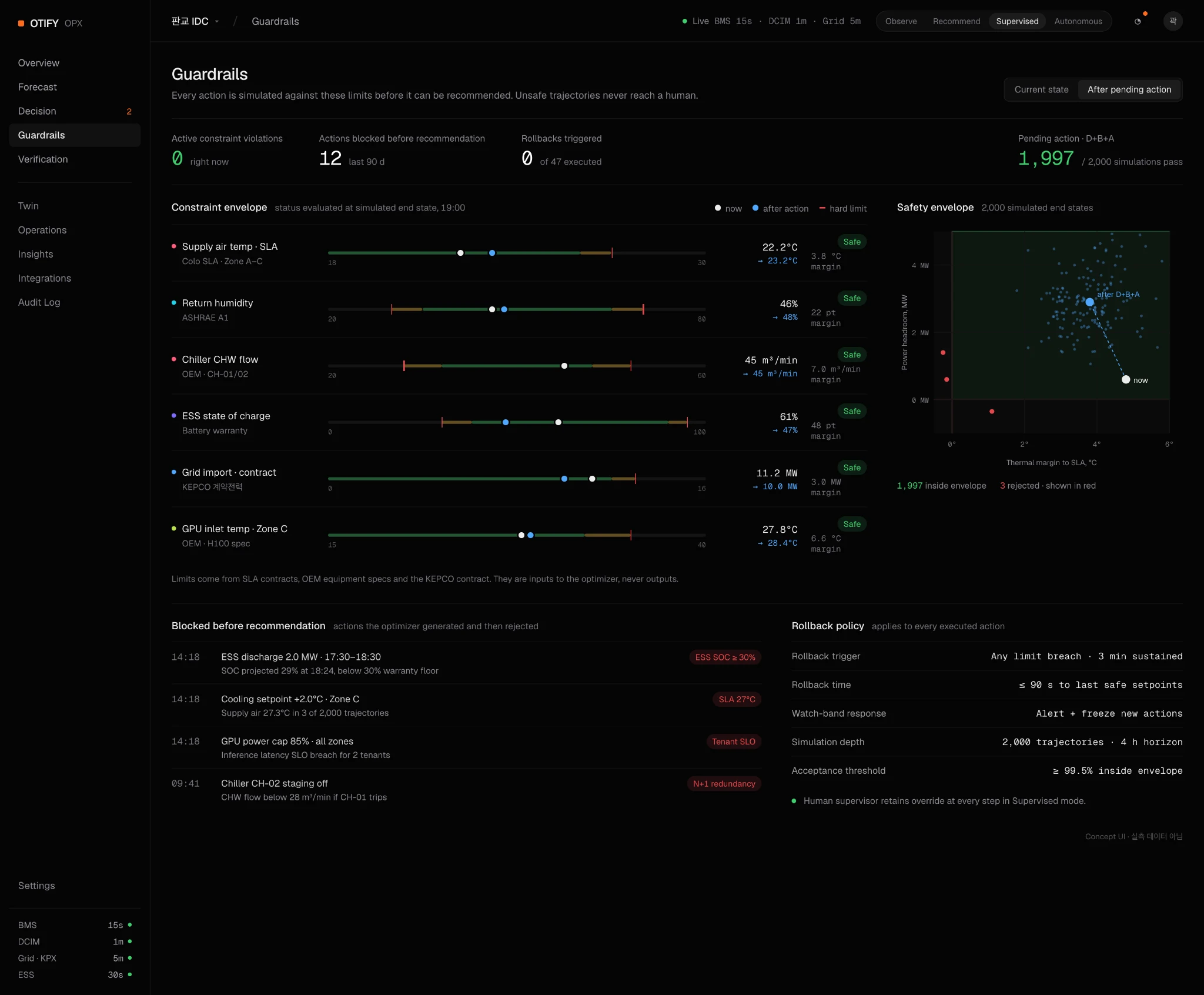 Product concept UI · Actual site limits are defined separately
Operations · Track execution
Review when and where an approved response is to be applied. The design distinguishes pending, running, completed and stopped states, helping operators identify differences between the planned response and actual progress.
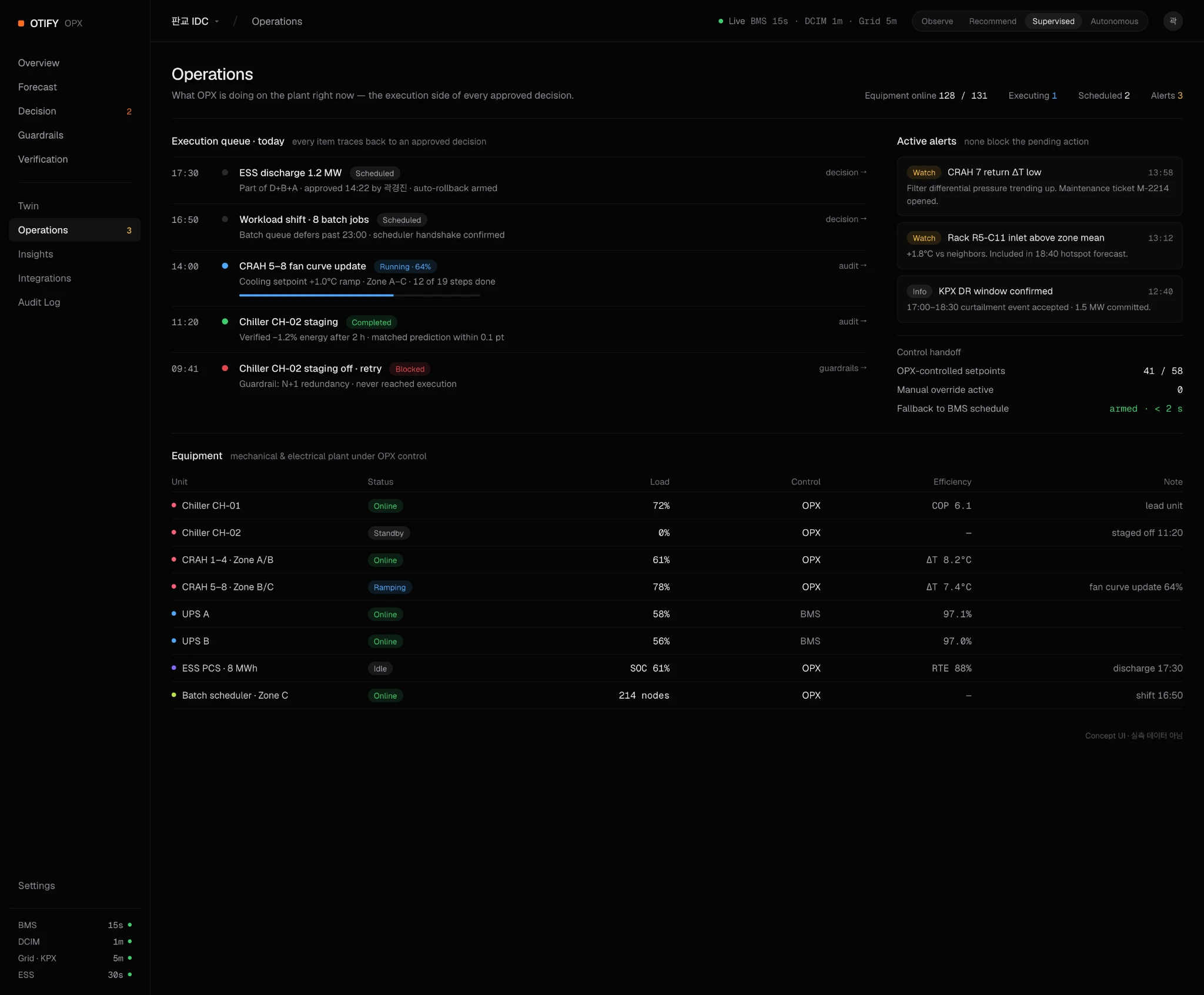 Concept UI · Not live equipment execution status.
Verification · Review outcomes
Compare expected results at execution with subsequent observations over the same period and in the same units. Evaluate forecast error separately from response impact, accounting for changes in workloads and outdoor conditions.
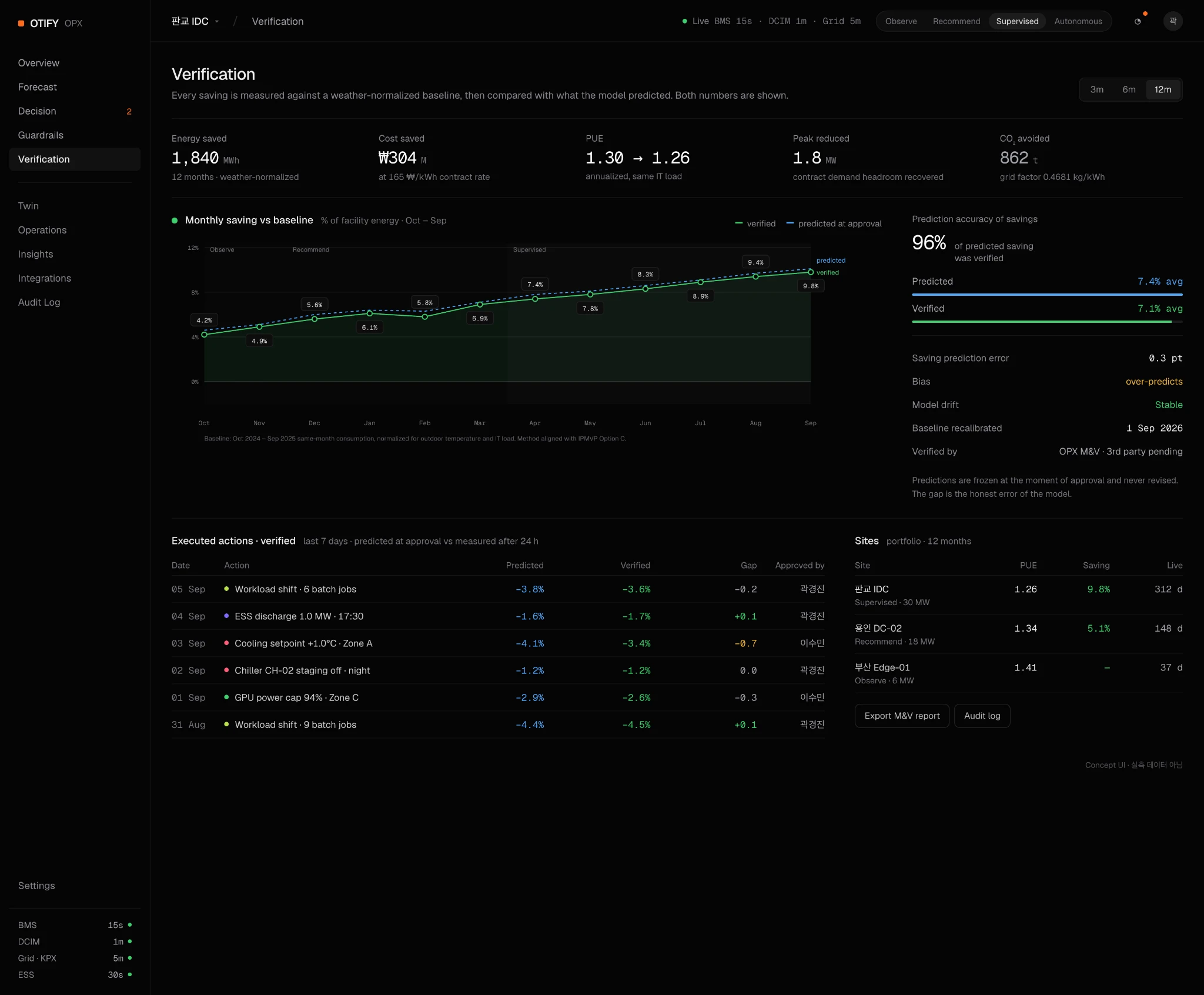 Product concept UI · Does not represent measured savings
QUNIA DOCUMENTATION / 03
Scenario guide
From forecast to approval
Product concept guideUpdated October 5, 2026
Responding to a power peak
- In Forecast, review the predicted peak time and headroom against contracted power.
- In Decision, compare storage discharge, workload distribution and combined responses.
- Check changes in temperature, job schedules and storage charge as well as power.
- In Guardrails, review compliance with site-specific limits.
- An authorized approver reviews the impact and conditions before deciding whether to proceed.
Responding to thermal risk
Additional cooling may limit a temperature rise while increasing electricity demand. Moving a workload requires resources at the destination. This scenario is about assessing connected operating conditions, rather than improving one metric in isolation.
Explore the scenario
The homepage compares two operating approaches under the same rising-load scenario, with response options and the evidence needed before approval.
View the operating scenario ↗The scenario is illustrative. It does not run live model inference or send commands to equipment.
QUNIA / INTEGRATION ARCHITECTURE
Integration with existing systems
Retain existing controls. Connect forecasts to operational decisions.
Separate telemetry from execution authority
QUNIA adds forecasting and response evaluation alongside your existing controls. Operating limits and execution authority remain governed by site policy.
Site equipmentCooling · Power · Energy storage
SCADA / BMSTelemetry · Existing controls
QUNIA · OPX / LPMForecasting · Response evaluation · Constraint checks
OperatorReview conditions · Authorize actions
Execution path: Operator → Existing control system → Site equipment
Telemetry flows from existing systems into OPX. OPX uses LPM forecasts to evaluate candidate actions against operating constraints; an authorized operator decides whether to proceed. Approved commands pass through the existing control path only where control integration has been agreed and implemented.
Responsibilities by component
- SCADA / BMS
- Collects site telemetry and controls equipment. Existing control logic and protective systems retain responsibility for equipment operation.
- LPM
- OTIFY’s core predictive technology models relationships between industrial signals to forecast future conditions and uncertainty.
- OPX
- The execution engine connects LPM forecasts to candidate-action evaluation and constraint checks. Its execution scope is defined by the agreed operating mode.
- QUNIA
- The operator-facing platform brings forecasts, response evaluation, approvals and outcome verification into a connected workflow.
- Operator
- Defines operating policy, approval authority and stop conditions, and decides whether an action should proceed.
Start with read-only access. Agree on control scope separately.
Begin with read-only telemetry and forecast evaluation. Before enabling control integration, define permitted commands, approval authority, command validity, communication-failure handling and recovery procedures. Supported protocols and control capabilities must be confirmed for each deployment.
Review integration prerequisites ↗What changes for the operations team?
Compare the workflows side by side, including the decision support and operator benefits at each stage.
Compare operating workflows ↗QUNIA DOCUMENTATION / 04
Data integration & deployment readiness
What to prepare before a site discussion
Product concept guideUpdated October 5, 2026
Identify the systems in scope
List installed systems and their owners, including BMS/BEMS, DCIM, job schedulers and storage management. The items below are integration assessment areas, not a confirmed list of supported systems or protocols.
| Domain | Example data to review |
|---|
| Power | Metered power, contracted power, zone and equipment identifiers |
| Cooling & thermal | Temperature, cooling equipment status and setpoints |
| Compute | Resource utilization, job schedules and completion deadlines |
| ESS | State of charge, charging/discharging limits and minimum reserve requirements |
Assess data quality
- Are timestamps and time zones aligned?
- Are sampling intervals, units and equipment names consistent?
- Can missing values, duplicates and measurement errors be distinguished?
- Can historical data and operating event logs be provided?
The required history and sampling interval are determined after reviewing the forecast target and site data characteristics.
Access & security requirements
Assess read access and control-command permissions separately. Discuss network access, account provisioning, data transfer, retention, on-site deployment and security review requirements during the deployment discussion.
API documentation
These docs do not yet include a public API specification. Authentication, endpoints, request and response formats, and supported protocols need separate documentation based on the confirmed implementation.
QUNIA / PRODUCT GUIDE
Starting in Observe mode
Understand the data first. Define execution scope as the evidence develops.
Design approach · Concept UI
Purpose of the observation stage
Observe mode is a deployment approach that reviews data and forecasts without issuing control commands. It evaluates how well the model explains site operating patterns and which information supports operator decisions.
What to prepare
- The site, metering points and data owner
- Sampling intervals, units, time zones and missing-data status
- Priority forecast metrics and risk thresholds
- Evaluation period, metrics and reviewers
From observation to recommendations
01 · Validate the data connectionCheck access permissions, signal mapping and data quality.
02 · Review forecast performanceCompare forecasts with observations, including missed risks and unnecessary alerts.
03 · Agree on the next stageUse the evaluation results to agree on the scope and workflow for recommendations.
There is no universal deployment period. Data requirements and progression criteria depend on the site.
Observe Console
 Concept UI · Not measured data. Durations and evaluation figures are examples, not fixed deployment requirements.
QUNIA DOCUMENTATION / 06
PoC planning & validation
Start with a focused, testable objective
Product concept guideUpdated October 5, 2026
Define the pilot scope
Specify the site or zone, forecast metrics, forecast horizon and responsible owners. Distinguish whether the pilot covers data connectivity, forecast review, response recommendations or actual control.
Agree on evaluation metrics
| Evaluation area | What to assess |
|---|
| Forecast quality | Error by forecast horizon, peak timing error and handling of missing data |
| Response feasibility | Constraint compliance and acceptability to site operators |
| Operational impact | Change against a baseline and the influence of external conditions |
| Operational reliability | Behavior during data delays, failures and interruptions |
Keep different types of evidence separate
Engine evaluationmeasures predictive performance on specified data under defined conditions. Field validationrecords outcomes observed in a real operating environment. Operational savingsrequire a separate evaluation that includes the baseline and cost assumptions.
Do not use savings percentages or forecasts from illustrative UI as PoC results. Share the period, scope, baseline and evaluation method alongside any validation findings.
Meeting preparation checklist
- Facility and priority operating challenge
- Integration inventory and sample data
- Operating limits, including contracted power, temperature and SLAs
- Security and access owners
- Success criteria and review schedule
Explore the deployment approach ↗QUNIA DOCUMENTATION / 05
Operating permissions & constraints
Keep people at the center of operational decisions
Product concept guideUpdated October 5, 2026
Understand the operating stages
| Stage | Operating approach |
|---|
| Observe | Review data and forecast outputs |
| Recommend | Propose response options for operator review |
| Supervised | Execute after approval by a designated authority |
| Autonomous | A target stage for automatic execution within a validated scope and policy |
These stages describe an operating model, not current availability of every stage. Equipment control and autonomous execution in particular require separate confirmation of availability and scope.
What to check before approval
- Equipment or zones in scope and the application window
- Expected benefit and effects on other domains
- Compliance with power, temperature, SLA and storage constraints
- Approver permissions and execution owner
- Stop conditions and recovery procedures
How to review a response
- Check the context: Confirm the site, forecast timestamp and data freshness.
- Compare responses: Review the selected combination's effect and impact on other domains.
- Review conditions: Check constraints, the application window, approval authority and stop conditions.
- Track execution: Check that the approved version matches actual execution progress.
- Review the outcome: Compare the original forecast with later observations using the agreed evaluation criteria.
This sequence describes the intended product workflow. Actual execution permissions and available features depend on site scope and implementation status.
Records & retrospective review
Define the records needed to trace response options, reviewed conditions, approver, approval time, execution results and subsequent evaluation. Audit retention, change controls and automatic rollback support must be checked against the actual implementation and operating policy.
QUNIA / PRODUCT GUIDE
Verification & M&V
Assess forecast accuracy separately from operational impact.
Design approach · Concept UI
Two distinct evaluations
Forecast evaluationassesses how accurately the future state was predicted. Operational impact evaluationassesses what changed after an action against a predefined baseline. A small forecast error alone does not establish cost savings.
What to agree before evaluation
- Equipment, metering points and evaluation period
- The target metric: consumption, peak demand or cost
- Baseline and treatment of changes in workload, weather and other conditions
- Handling of missing data and exceptional periods
- Reviewers and reporting cadence
Preserve the evidence available at the decision
The design aims to preserve the forecast and conditions at approval separately from later updates, so decisions can be reviewed against their outcomes. Retaining records alone does not establish impact.
M&V Report
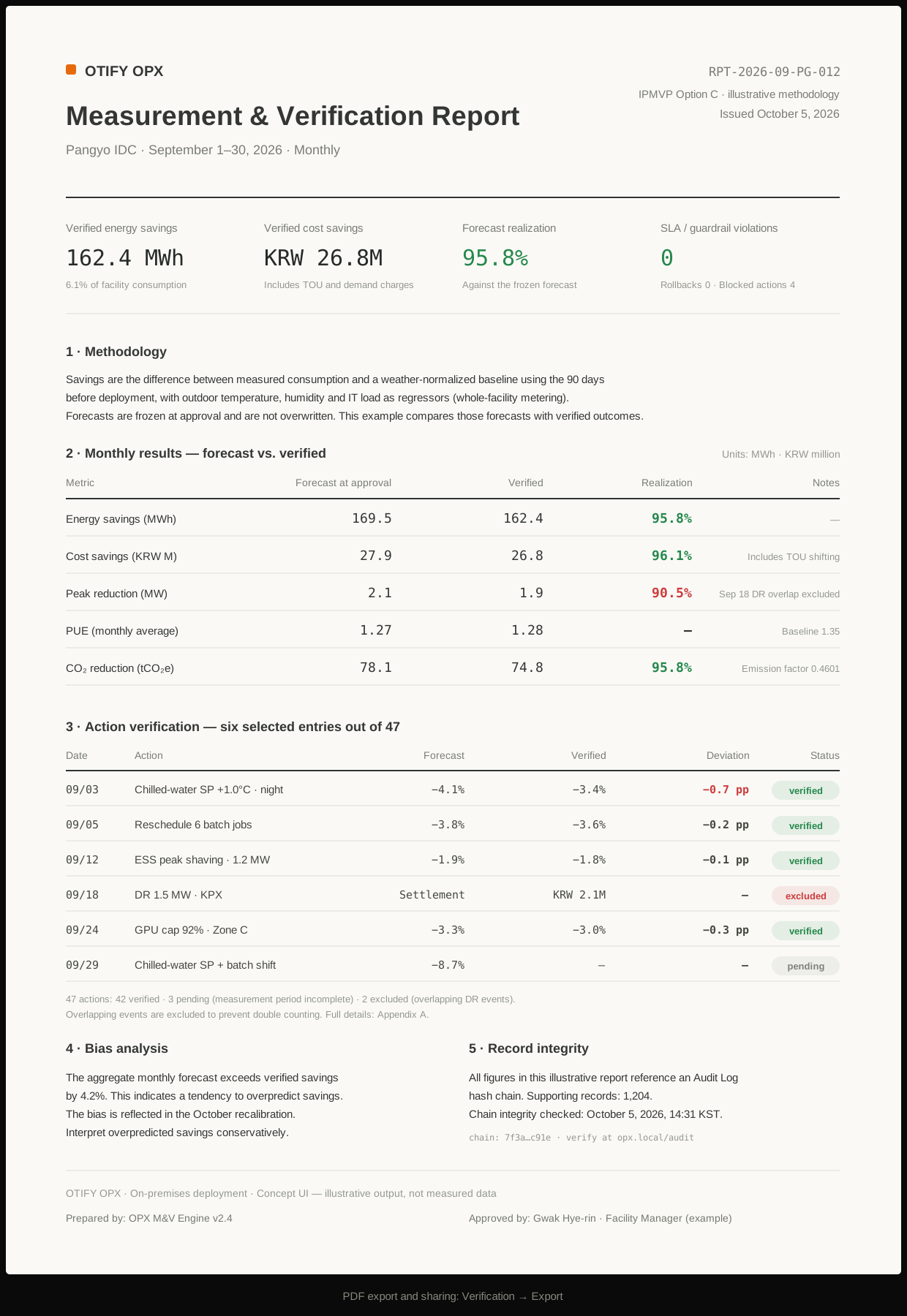 Concept UI · Figures and methodology labels illustrate a report structure. They do not represent actual results, compliance with a specific standard or third-party certification.
QUNIA DOCUMENTATION / 07
Glossary & FAQ
Common terms & questions
Product concept guideUpdated October 5, 2026
Key terms
- LPM
- OTIFY's core technology underlying the QUNIA platform and OPX engine.
- ESS
- Energy Storage System. Equipment that stores electrical energy and supplies it when needed.
- SLA
- Service Level Agreement. A commitment defining service requirements, including site-specific performance and availability criteria.
- DCIM
- Data Center Infrastructure Management. Systems for managing data center infrastructure conditions and resources.
- BMS / BEMS
- Building Management System / Building Energy Management System.
- Guardrails
- Operating limits and constraints that must be respected when evaluating a response.
- PoC
- Proof of Concept. A bounded evaluation of technical and deployment feasibility.
Will we need to replace existing systems?
The assessment starts with your existing systems and data environment. Integration scope and any required changes depend on the site's configuration.
Does this website let me operate a live facility?
This website provides product concept screens and illustrative scenarios. It is not connected to live facility data or equipment controls.
How long does deployment take, and what does it cost?
Timing and cost are agreed after assessing integrations, data quality, scope, security requirements and support needs. These docs do not specify a fixed standard price or deployment duration.
No results found.
Try another term or clear the search.